[01]
Game / Window · Display
Choose your source
Select a game, window, or full display. Klip remembers your source for next time.
Klip for Windows
Capture the moment before you miss it.
download Klip 2.0.2 betaone focused capture tool
Klip 2.0 brings OBS-powered capture, replay, recording, and audio control into one focused dashboard. no scenes, browser sources, account, or cloud workflow to configure.
duration-first buffering keeps your selected history once warmed up; constant quality is optional
record complete sessions with a global keybind
balance desktop and microphone levels before capture
choose a supported hardware encoder and 60 or 120 fps; compatibility varies by GPU
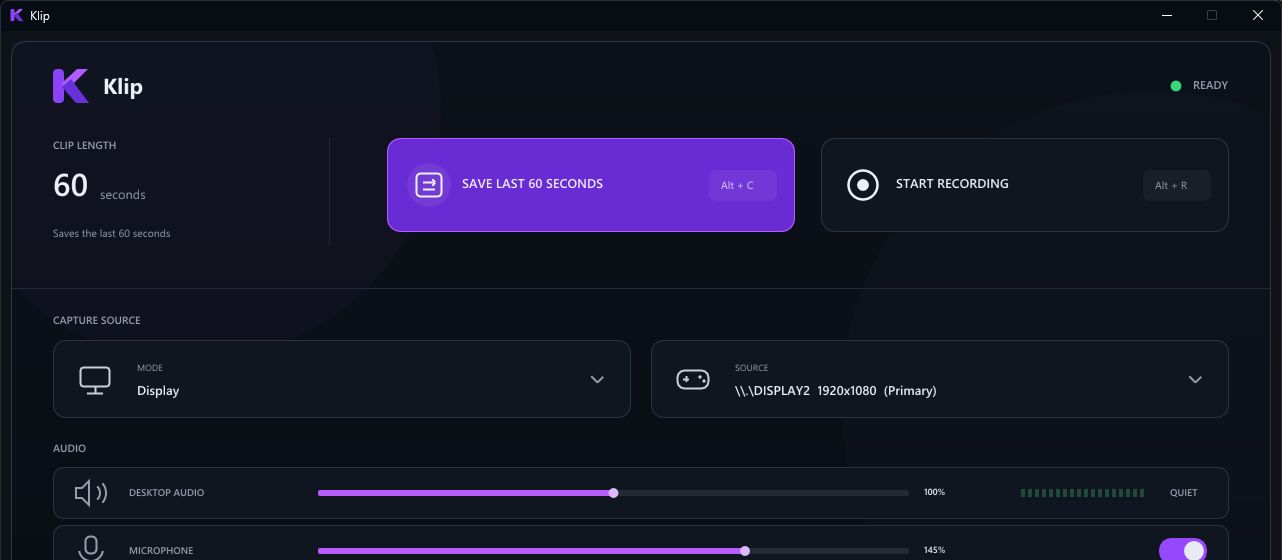
stock OBS game capture, hardware encoding, and compressed replay buffering replace the original capture engine. performance mode uses lighter encoder tuning, with an explicit quality tradeoff.
download for Windowschoose your source, set your sound, and let Klip quietly keep the last few minutes ready to save.
Game / Window · Display
Select a game, window, or full display. Klip remembers your source for next time.
Desktop · Microphone
Turn desktop audio and microphone capture on or off, then adjust each level from the dashboard.
Alt + C · Alt + R
Save the replay buffer with Alt + C or start a full recording with Alt + R.
install Klip for Windows and start capturing locally. no account, no cloud, no subscription.
public beta notice: this build is unsigned. verify its checksum before installing; do not disable Windows security. hardware and game compatibility vary, and broader testing is ongoing. clips and recordings save as MKV. duration-first mode limits bitrate to fit replay memory; demanding scenes may lose detail, including in recordings. let the buffer warm up after starting or changing settings. install this version once to get approval-based in-app updates; portable copies still update manually. trimming saves a separate lossless copy with keyframe-aligned edges, not frame-exact cuts. Linux downloads are not available yet.
small, focused releases that make capture faster, clearer, and more dependable.
get the latest buildchoose start and end points with a scrub preview, then save a separate MKV copy without re-encoding video or audio
cuts snap outward to keyframes; the editor shows the actual range and keeps your original clip untouched
Settings → Updates checks signed release manifests. downloads require approval; installed copies can update and restart when capture tasks are idle
signatures, file hashes and sizes are checked before installation. active recordings, replay saves and trims prevent an update restart
keeps the duration-first replay fix, customizable global shortcuts, shared recording encoder and event-driven dashboard
older releases need this installer once to get the updater. clean-PC upgrades and wider hardware coverage remain in beta testing; Linux desktop support is not released